

Order Volume offer
Learn how to set spend thresholds that lift AOV, when to use percentage vs amount off, and how to make sure customers see the offer before they reach the cart.
The simplest AOV offer: spend more, save more. No product targeting, no pairing logic, no specific item the customer needs to add. Whatever is in their cart counts toward the threshold.
Order Volume works with a percentage off or a fixed amount off the total order. The discount unlocks automatically as the customer’s cart grows.
Examples from real brands
When to use Order Volume
Order Volume is a strong fit when:
- Your catalog is broad and no single product or category stands out as a natural upsell target.
- You want to reward higher spend without being tied to what is in the cart.
- You are running a storewide promotion and want a structured incentive rather than a flat discount.
It is the most flexible offer Upnova offers: because it applies to the whole order, any customer can qualify with any combination of products.
When not to use Order Volume
Order Volume is an order-level discount, which means it stacks differently with other discounts than product-level offers do. If a customer uses a coupon code alongside an active Order Volume offer, both discounts can apply to the same order. Check your discount combination settings in Shopify before running both at the same time.
If you have a specific product you want to push, or a natural gift item to offer, Free Gift or Buy X Get Y will do more targeted work.
How to set your spend thresholds
The first tier should sit just above where most of your orders already land. Customers in that range will feel close enough to stretch for one more item.
Use Shopify Sidekick to find the right numbers. Here is where to find it in your admin:
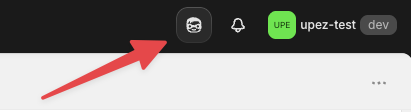
Open Sidekick, then paste this prompt:
Sidekick will analyze your order value distribution and propose thresholds based on where your orders actually cluster.
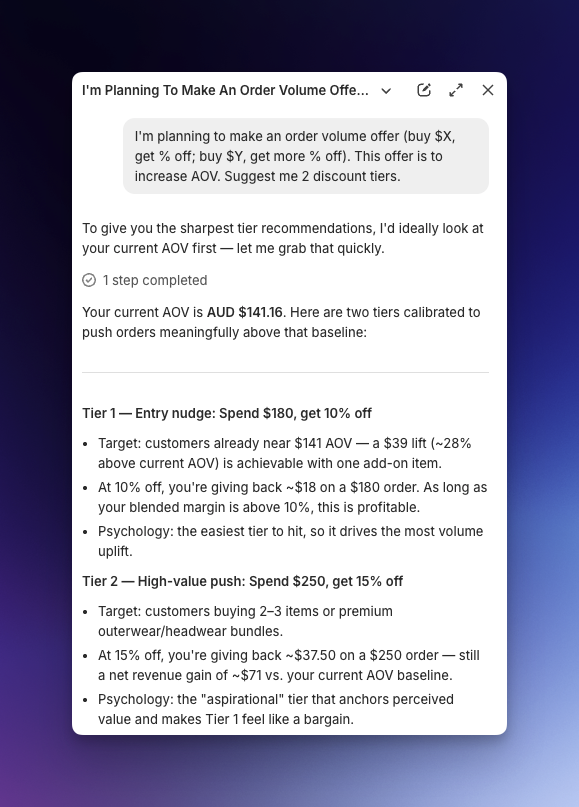
From there, apply the same rules as other offers: make the jump between tiers meaningful enough that customers feel motivated to reach the next level, not just coast at the first one.
Run this check every few months. As your product mix and pricing shift, your order value distribution shifts too, and your thresholds should follow.
How to promote Order Volume
The offer widget lives in the cart, but waiting until customers open the cart to tell them about it is too late. Add a message to your store’s announcement bar at the top of the site so customers know about the deal from the first page they visit.
A simple format that works: “Spend $59, save 10% | Spend $79, save 15%.” Visible, specific, and it sets the expectation before they start adding items.
Protecting margins on sale products
If you are running a sale on specific products and do not want the Order Volume discount to stack on top, tag those products in Shopify with upnova-discount-excluded. Upnova will leave those products out of the discount calculation, so the percentage off only applies to full-price items in the cart.
Excluding wholesale and B2B customers
If you have wholesale or B2B customers who should not see Upnova offers, tag them in Shopify with upnova-wholesale. Upnova will automatically exclude tagged customers from all offers across the app. No offer will appear or apply to their orders.
Common mistakes
Tiers set too close together
If the difference between tier 1 and tier 2 is $5 or 2%, there is no reason for a customer to push further. The tiers need a gap that feels worth the extra spend. Use the Sidekick suggestion as a starting point, and make sure each tier offers a noticeably better deal than the one below it.
Not promoting in the announcement bar
An Order Volume offer that only appears in the cart is half as effective as one customers know about before they start shopping. A customer who sees “spend $79, save 15%” on the homepage will build their cart with that number in mind. A customer who sees it only at checkout has already made most of their decisions.