
Free Gift offer
Learn when to use it, how to set it up, and the tips that make it convert.
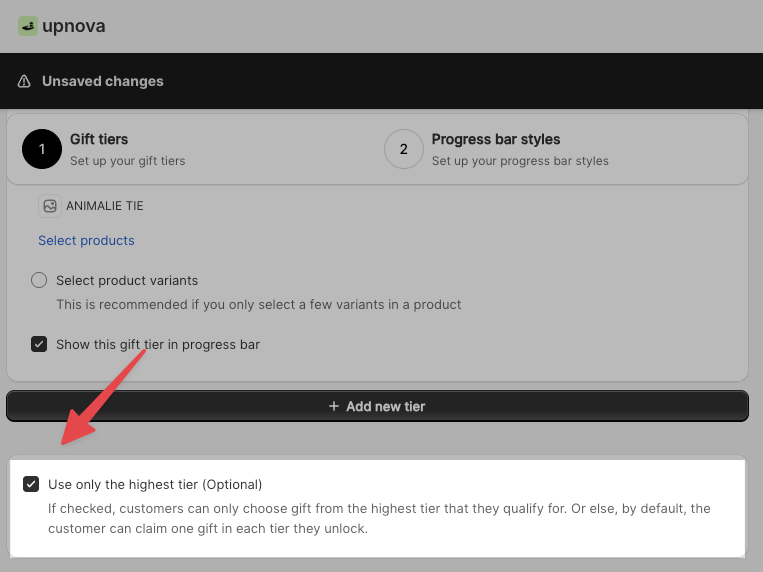
The Free Gift offer rewards customers for spending more. When a shopper reaches a threshold (say $100), they unlock a free product of their choice. You can stack multiple tiers so that, for example, reaching $150 unlocks an even better gift.
It is the most widely used offer type in Upnova and works across almost every product niche.
Examples from real brands
When to use Free Gift
Free Gift is a strong fit when:
- You sell fashion, supplements, accessories, toys, pet products, or anything with a clear “crowd-pleaser” item at a low cost.
- You have a product that feels special to receive but is cheap enough to give away without hurting margin.
- You want a persistent, visible AOV driver in the cart at all times.
- You are running a time-limited promotion and want to add urgency.
It applies to almost every niche. The deciding factor is not the category, it is whether you have the right gift.
When not to use Free Gift
Skip Free Gift (or pause it) if you do not have a genuinely desirable item to give away. Generic gifts (a plain tote bag, gift wrap, a branded pen) do not move most shoppers. If the gift would not excite your own best customers, it will not lift AOV.
Setting up Free Gift in Upnova
Go to Offers → Create New Offer → Free Gift.
- Name your offer clearly. Use the actual gift product name, not “free gift.” Customers see this name before they unlock the tier, and a specific name creates curiosity and pulls them in.
- Set a spend threshold for each tier. Think of each tier as a target, not a floor (see the next section for how to choose the right amount).
- Select the gift products for each tier. These are the options customers will choose from once they unlock that tier. Add at least one strong image per product.
- Add a second tier. Even if the second threshold feels generous, having it creates a price-anchoring effect that makes the first tier look achievable.
How to pick your spend threshold
The goal is to set a number that the majority of your customers can almost reach, so they feel motivated to add one more item rather than give up.
Use Shopify Sidekick. Here is where to find it in your admin:
Open Shopify admin → Sidekick (the AI assistant icon), then paste this prompt:
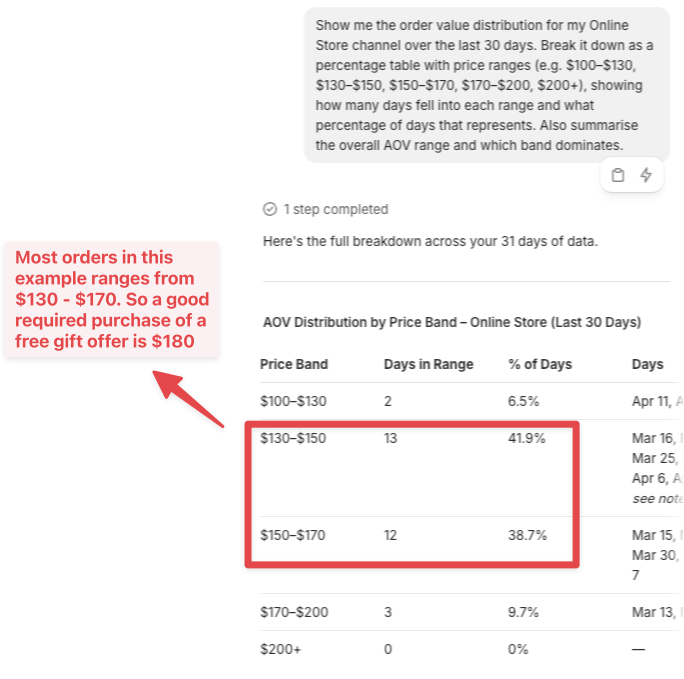
Look for the band that dominates. That is your core spending range. Set your first tier 10–20% above the top of that band.
The logic: customers in that majority group are close enough to feel the tier is reachable. Combined with the cross-sell products shown in the cart, most of them will grab one more item to unlock the gift.
Do this check before you launch and again every few months. As your product mix or pricing changes, your order distribution shifts, and so should your threshold.
Common mistakes
1. Naming it “free gift”
If customers do not know what the gift is, they will not try to earn it. Use the product name: “Free snapback cap” or “Free collagen sample” performs far better than a generic label.
2. Weak product images
The gift thumbnail is visible in the cart before the threshold is reached. A low-quality image signals a low-value gift. Use the same photography standards you would on your product pages.
3. Setting the threshold too high
If the target feels far out of reach, customers ignore it. Use the Sidekick method above to find the right number before you publish.
4. Setting the threshold too low
If most orders already hit the threshold, you are giving away product without lifting AOV. The Sidekick method above will tell you if your number is too low.
Tips that improve conversion
Pick a gift that is desirable and low cost. The best gifts feel like a treat but are cheap enough to give at scale. Think samples, branded accessories, or low-cost SKUs with high perceived value.
Use two tiers minimum. The second tier anchors the first. Even if few customers reach tier two, its presence makes tier one feel achievable, and customers will stretch to hit it.
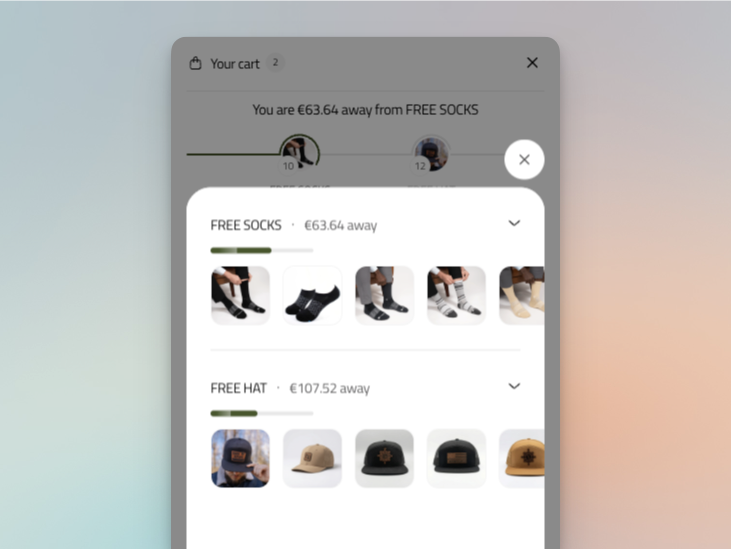
Make the gift presentation strong. Great images and a clear product name in the offer card do a lot of the conversion work before the threshold is reached.
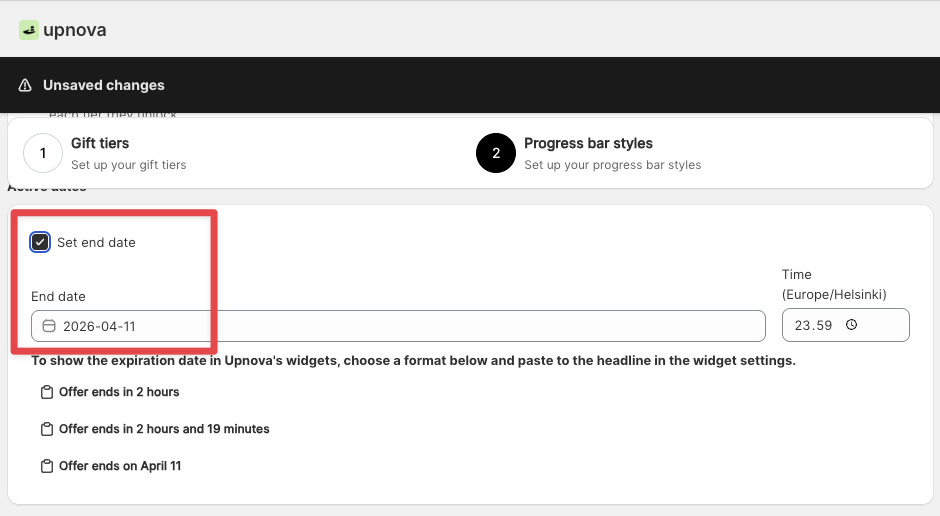
Add an expiration date for promotions. A Free Gift offer with a deadline consistently outperforms one that runs indefinitely. Use the end-date setting to run a limited-time push and re-run it when you need an AOV spike.
Advanced settings
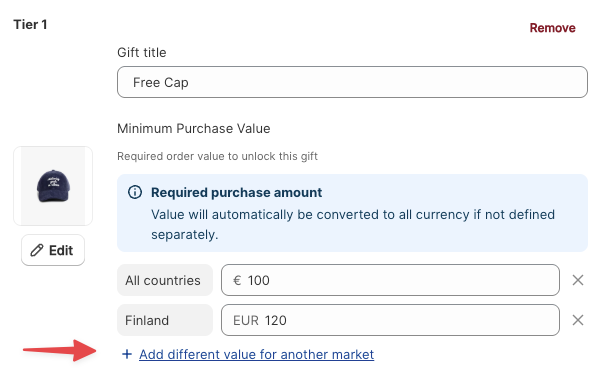
Geo-based thresholds. Set different spend amounts per country. Useful if your prices vary by market.
Limit to one gift total. Customer gets one gift no matter how many tiers they unlock. Use this to protect margin on high-AOV orders.